How to Reset a Height-Adjustable Desk
A height-adjustable desk that stops moving usually needs a reset, not a repair. Here's how a reset works, the safe steps to do it, and when to call support.

When an electric desk suddenly refuses to rise, or sinks to its lowest point and stops, the fix is almost always a reset, not a repair. A reset tells the desk to find its own floor again and start counting from there, and it is quick to do. This guide covers why a height-adjustable desk stops moving, the checks worth doing first, how a reset actually works, what it does to the heights you saved, and when a stall is a real fault instead. Every step below comes from desk and controller makers you can open and read.
Why a height-adjustable desk stops moving
An electric desk keeps a running count of how high its legs are. BTOD's reset guide explains that after a power loss the controller loses that memory and has to find its lowest reference point again before it will move properly. Until it does, many desks will only travel downward, a safety behaviour that forces you to send the desk to the bottom first.
A few things make that count drift. TiMOTION, which makes desk control systems and motors, lists power outages or surges that freeze the control box, cables that have worked loose and caused a slight misalignment, an error code on the handset, and the two motors falling out of synchronisation. That last one tends to show up as a desk that rises unevenly or leans to one side. It is more common on dual-motor desks, where each leg has its own motor to keep in step, and our single versus dual motor guide explains why the two behave differently.
Check these before you reset
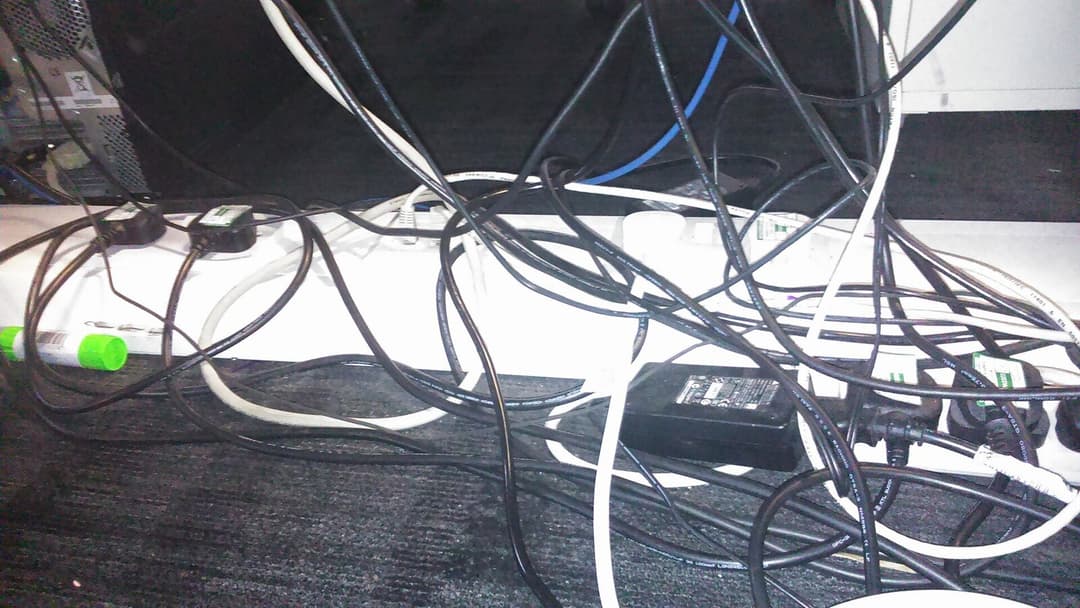

A reset is not always the first thing to try. TiMOTION says to clear any objects blocking the desk's vertical travel and to inspect every cable, replacing a damaged one, before you reset at all. An obstruction above or below the desk, or a plug that has crept loose, can halt the desk on its own, and no reset will fix a cable that is half out of its socket.
So start low-tech. Clear the floor under the desk and anything stacked on top, then run a finger along each cable from the handset, the control box and both leg motors and press the plugs home. Check the power brick is seated at both ends. If there is a message on the display, read it before you do anything: TakeAseat, a Singapore retailer, notes that an ASR message usually means the desk is simply asking to be reset.
How to reset the desk, step by step
The exact buttons differ by controller, but the idea is the same every time: drive the desk to its very lowest point so it can relearn the floor. BTOD gives the common version. Unplug the desk for about 30 seconds, plug it back in, press and hold the down button until the desk reaches its lowest point, release, then press and hold the down button again for several seconds until a small upward movement signals that the reset is complete.
Some controllers want both hands. TiMOTION describes holding both the up and down arrows together until the desk reaches the bottom and beeps, after waiting at least 30 seconds once the power has been cut. Where a desk shows that ASR prompt, TakeAseat says holding the down button for about three seconds, then releasing, lowers the desk and clears the message. If the first attempt does not take, its next step is to switch the desk off, disconnect the power for about a minute, check every cable once more, then reconnect and reset again. Keep the space under the desk clear throughout, because the desk will drop to its lowest point on its own.
What a reset changes, and your saved heights


A reset can wipe the heights you saved, and that catches people out. Here the controllers split. TiMOTION draws the line clearly: a normal reset realigns the system without removing your personalised adjustments, while only a factory reset returns the desk to its default settings. BTOD notes that on some desks a reset does clear the saved height positions. Treat your presets as if they may be gone, then, and be ready to set them again.
On a dual-motor desk like the Vival Desk, that part is quick. Its controller has three one-touch presets, labelled M+1, M+2 and M+3, with an LED readout of the height. Move the desk to each height you use, save it to a preset, and the lit number confirms you are back where you set it afterwards. If you would rather set those heights from scratch, our standing desk height guide walks through the numbers.
When a reset is not the answer
Most stalls clear with a reset. A few do not, and it helps to know the difference. If the desk still will not move after a clean reset and a cable check, if it trips the same error straight away, or if a motor grinds or one leg plainly lags, the trouble is hardware rather than calibration. At that point you are into a warranty conversation, not another reset.
This is worth knowing before you replace anything. When we read the brands' own price lists on 10 October 2026, six dual-motor standing desks sold in Singapore, from two brands, ran from S$329 to S$1,760, so a desk that has only lost its calibration is well worth a reset before you shop for a new one. If the fault turns out to be real, our FAQ sets out the cover: every Vival Desk carries a one-year warranty from delivery against manufacturing defects, a genuine defect is replaced at no cost, and support is a WhatsApp message away. A desk built on dual motors has more to keep in step than a single-motor one, which is exactly why a quick reset is part of owning one.
Reset first, check your cables, save your heights again, and most of the time you are back on your feet in minutes.